TL;DR
Since September 16, 2026, a new Claude artifact opens only for people signed in to Claude, even with "anyone with the link." A client with no account hits a sign-in screen. The fix: take the artifact's HTML out of Claude and put it on a link that needs no account. Two narrower routes exist for legacy and Claude Code artifacts.
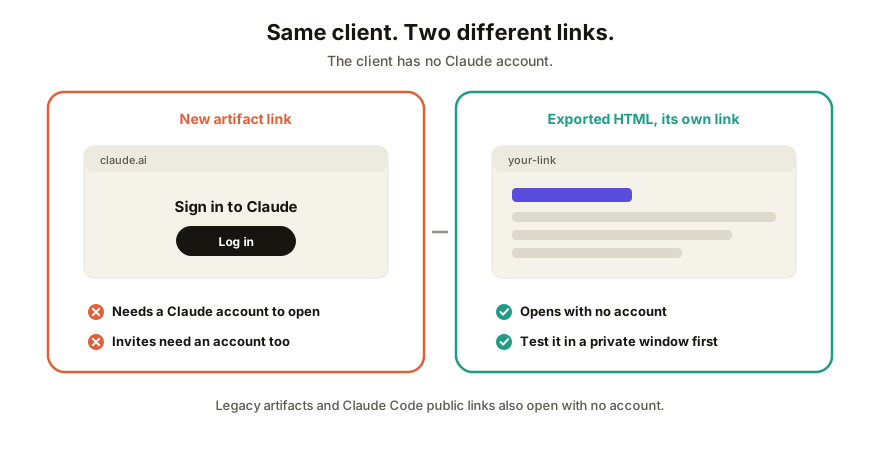
Why your client is seeing a sign-in screen
Claude's Help Center describes the audiences for a new artifact as only you, specific people by email, your organization (Team and Enterprise), and "anyone with the link." That last one is defined as "anyone signed in to Claude who has the link." Email invitations work the same way: the invitee needs a Claude account on the invited address. The full rules are here.
It's not a bug, and it's not your settings. We found no setting on a new artifact that turns the sign-in off. The fix is to change where the page lives, or to use one of the two kinds of Claude link that still open for everyone.
Option 1: take the HTML out and give it a link with no sign-in
This works for any artifact, old or new, and it works for output from ChatGPT or Gemini too, because an artifact is a web page underneath.
- In the Claude chat that made the artifact, ask for the whole thing as one self-contained HTML file: "Give me the complete artifact as a single HTML file with the CSS and JavaScript inline."
- Copy the code block, or save it as a file ending in
.html. (If you're not sure what you're holding, here's what that file is.) - Put it somewhere that serves web pages. A free static host works, and so does a collaboration tool. Pick by what you need next: the options are compared here.
- Open the link in a private window, where you're signed in to nothing. If the page loads and works, your client's will too.
- Send the link.
Step 4 is the one people skip. It's also the only test that matches what your client will see.
A caveat worth knowing: a page that fetches data from outside, or that calls Claude from inside the page, won't behave the same once it's out of Claude's sandbox. Check the interactive parts in that private window before you send it.
Option 2: a legacy artifact's public link
Artifacts made in a chat before September 16, 2026 are "legacy artifacts." Claude's Help Center says they keep working and can still be published, and that on a published legacy artifact "anyone with the link can view and use it without a Claude account." It's shown as Publish on Free, Pro and Max. Team and Enterprise get Share & copy link instead, and the Help Center's plan table shows legacy publishing as unavailable there.
Two catches. You can't make new legacy artifacts, so this only helps with old work. And publishing is permanent: per the Help Center, you can't publish an artifact again after you unpublish it.
Option 3: a Claude Code artifact's public link
If the page came from a Claude Code session, the Claude Code docs describe a public link that "anyone on the internet can open, with no claude.ai sign-in required." It's available on Pro, Max, Team and Enterprise. On Team and Enterprise it stays off until an Owner turns on External sharing.
The limits: people who only hold the public link can't see or add comments, and pages that pull live data through connectors show up without those live sections for someone who isn't signed in.
Which route to use
| Your situation | Use | Client needs an account? |
|---|---|---|
| Any artifact, and the client should be able to comment or edit | Option 1 with a collaboration link | No |
| Any artifact, and they only need to look | Option 1 with a static host | No |
| An old artifact from before Sept 16, view only | Option 2, Publish | No |
| A page from a Claude Code session, view only | Option 3 | No |
| A new chat artifact, shared straight from Claude | Claude's own share | Yes |
How Coedit fits
Coedit is the collaboration-link version of Option 1. Paste the HTML in and you get one link that opens with no account, where the client can leave comments pinned to the element they mean, and people you allow can change copy and styling without touching code. Every human and agent change lands in one version history, and paid plans put the link on your own domain. It never generates anything. Claude made the page; Coedit is where the person without a Claude account gets to use it.
FAQ
Q: Why does my Claude artifact ask my client to sign in? A: Because new artifacts share only with people signed in to Claude. "Anyone with the link" means anyone signed in to Claude, and invited people need an account on the invited email. The no-account public link survives only for legacy artifacts and Claude Code artifacts.
Q: Is there a setting that makes a new Claude artifact public with no sign-in? A: Not that we could find in Claude's current Help Center pages. The no-account public link is documented for legacy artifacts and for Claude Code artifacts. For everything else, take the HTML out and host it.
Q: Can I still publish old Claude artifacts to a public link? A: Yes, if they were made before September 16, 2026, on Free, Pro or Max. Publishing is permanent: you can't publish the artifact again after unpublishing it.
Q: Will the exported page work exactly like it did in Claude? A: Usually for self-contained pages, but not always. Pages that call Claude from inside, or that load outside data, may behave differently. Test the link in a private window before you send it.
Q: Do I need to pay to share a Claude artifact with someone outside Claude? A: Not for the HTML route. Free static hosts exist, and Coedit's free plan covers real client work. Custom domains are on paid plans.