TL;DR
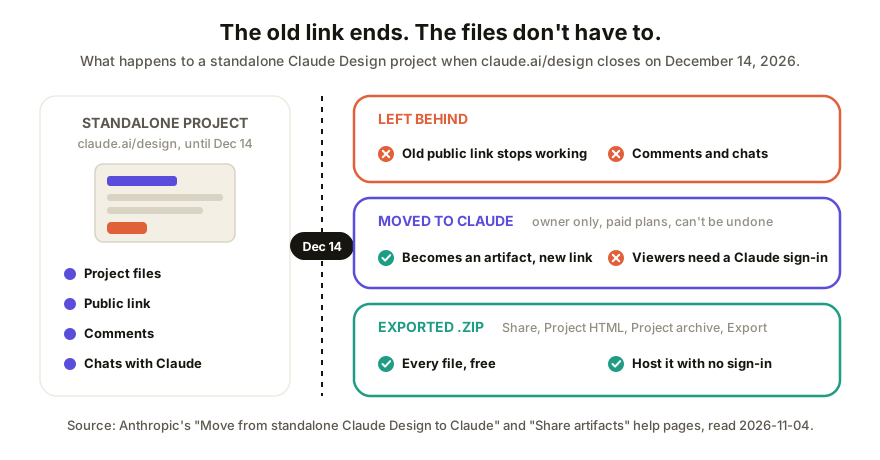
The standalone Claude Design site (claude.ai/design) closes on December 14, 2026, and Anthropic says public links to projects there "will no longer work after it closes." Comments and chats don't move either. Before the 14th, export each project you've shared as a .zip, move the ones you want to keep into Claude, and send people a new link.
What's actually changing on December 14?
Claude Design now lives inside Claude, and the standalone version is being retired. Anthropic's migration guide lays it out: you can keep using claude.ai/design until December 14, 2026. After that it's read-only and you can't start new projects there.
New designs, design systems and slide decks you start in Claude today are created as artifacts. That's the important word, because artifacts follow Claude's artifact sharing rules, not the old standalone ones.
Will my Claude Design public links stop working?
Yes. The guide's exact words: "Public links to projects in the standalone version will no longer work after it closes."
If you sent a client, a stakeholder or a hiring manager a standalone Design link this year, that link has about six weeks left. Nobody gets a warning on their side. They'll click it after the 14th and land somewhere that isn't your project.
Moving the project doesn't rescue the old URL either. A moved project becomes a new artifact in Claude, with its own address, so you'll be sending a fresh link whichever route you take.
What moves to Claude, and what stays behind
| Moves to Claude | Stays in standalone, then deleted | |
|---|---|---|
| Project files | Yes, as an artifact (owner only, paid plans as it rolls out) | The read-only original, until it's deleted some time after the close |
| Design systems | Yes, one move brings over the organization's | Read-only original |
| Chats with Claude | No | Yes |
| Comments on projects and design systems | No | Yes |
| Public link | No, the artifact gets a new one | Stops working on December 14 |
| Sharing | "Sharing carries over where Claude supports it" | n/a |
Two lines in there deserve a second read.
Comments don't come with you. If a client left feedback on a standalone project, that thread is gone once the old version is deleted. Copy anything you still need into a doc now. The guide is blunt about it: "Save anything you need from your chats and comments before the standalone version closes."
A move can't be undone. After a project moves, the standalone copy goes read-only for everyone. That's fine, just don't move a project mid-review and expect your client to keep commenting on the old link.
How to keep a client's Claude Design link working after December 14
This is the route if someone outside your team needs to keep opening the work. Do it once per project.
- List the standalone projects you've sent to anyone. The Artifacts page in Claude shows up to 60 of your standalone projects, and they open in the standalone version.
- Download a copy first. Open the project at claude.ai/design, click Share, choose Project HTML (for a slide deck it's under More formats and apps), keep Project archive selected and click Export. You get a .zip of every file. It's free and doesn't count toward your usage limits.
- Move the project if you have the option. Open it in the standalone version, start the review from the pop-up or the banner at the top, read what moves and what stays, then confirm. Keep the tab open until it finishes. Only the project's owner can do this.
- Share the new artifact. Open it on the Artifacts page in Claude, click Share, and under Who has access pick who can open it. On Team and Enterprise, "Anyone with the link" only appears if an Owner has turned on External sharing or allowed that artifact.
- Open the new link in a private browser window. If it asks you to sign in to Claude, your client will be asked too.
- Send the new link, and say in one line that the old one dies on December 14.
Step 5 is where this route breaks for a lot of people. Claude's Share artifacts page says "Everyone needs a Claude account. People without one can't open a shared artifact, even with the link." The only exception is a legacy artifact published from a chat, and a moved Design project isn't one of those. So a client without a Claude account can't open your moved project at all, whatever you pick in the Share menu.
When moving isn't an option
Some accounts can't move projects, and Anthropic names them:
- Free plan. The guide says moving is "rolling out gradually to paid plans," and Claude's Free plan has no "Anyone with the link" option anyway.
- Zero data retention (ZDR) organizations can't turn on artifacts, so they can't move. Download your projects.
- HIPAA-ready organizations can't move projects right now.
- Customer-managed keys (CMEK) can move one project at a time, not lists.
If you're on Enterprise with a retention period that covers artifacts, there's one more trap: a moved project can be deleted if nobody opens it for that period, counted from the day of the move. Open the ones that matter.
For all of these, the .zip from step 2 is your copy. A download of all the projects you own is also rolling out alongside the move, on the standalone home page; it includes files, not chats or comments.
What to do with the exported .zip
The archive is a folder of HTML, CSS, images and fonts. It's a website, just not online yet. You've got the same options as for any HTML file you need to put online: drop it on a static host for a plain link, or import it into a tool built for review. If the project you exported was a single page, the account-free sharing guide for Claude artifacts walks through the same choices from the artifact side.
One caution: if your design has several linked pages, check them all after you host it. Some tools only treat the first HTML file as the page.
How Coedit fits
Coedit doesn't make designs, and it isn't a replacement for Claude Design. Claude made the work. Coedit is a place for the copy you send to people who don't have a Claude account.
Upload the exported .zip (or a single HTML file from Claude's Export as standalone HTML) in Coedit's New project box with Upload file / folder / .zip. The images and stylesheets come in with it. You get one link that opens with no account of any kind, comments pinned to the exact element someone means, text and style edits without code, and one version history covering your edits and any agent's. Right now Coedit treats the entry HTML file as the page, so a multi-page project becomes one page per import. It works the same for pages from ChatGPT, Gemini, Lovable or v0.
FAQ
Q: When does the standalone Claude Design site close? A: December 14, 2026. Until then you can keep working at claude.ai/design. After it closes, the standalone version is read-only and you can't start new projects there.
Q: Will my Claude Design public links still work after December 14? A: No. Anthropic's migration guide says public links to standalone projects "will no longer work after it closes." Moving a project to Claude creates a new artifact with a new link, so send the new link before the 14th.
Q: Do comments and chats move to Claude with my project? A: No. Chats and comments stay in the standalone version, where you can read them until it closes, and they're deleted some time after. Copy any feedback you still need before December 14.
Q: Can a client without a Claude account open my moved Design project? A: No. A moved project becomes a Claude artifact, and Claude's sharing page says everyone needs a Claude account to open a shared artifact, even with the link. To send it to someone without one, export the project and host the files somewhere that opens without a sign-in.
Q: How do I download a Claude Design project? A: Open it at claude.ai/design, click Share, choose Project HTML (under More formats and apps for slide decks), keep Project archive selected and click Export. You get a free .zip of every file in the project.