TL;DR
Feedback on a live page works best when the comment is attached to the thing it's about. Your real options: describe it in chat or email (free, but lossy), annotate screenshots (precise, but frozen), use a website-review tool (right idea, built for dev teams), or share the app on a surface with element-pinned comments built in. If the app came out of an AI tool, the last option is usually one paste away.
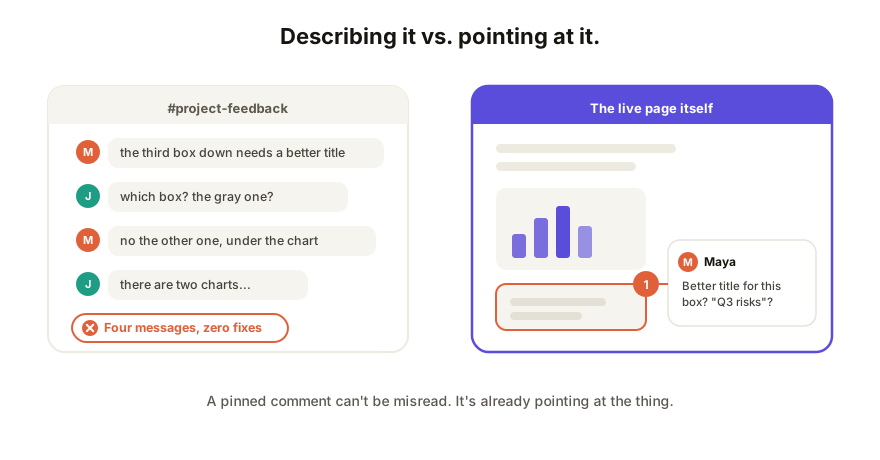
Why this is even a problem
A live app isn't a document. You can't highlight a sentence of it in Word, and unlike a design file, it has states: things appear on click, on hover, after a filter. So feedback ends up describing locations instead of marking them: "on the pricing card, under the second toggle, the gray text." Every reader parses that description differently, and half the review cycle goes to figuring out what the comment was even about.
The fix, whatever tool you pick, is anchoring: a comment that knows which element it belongs to.
Option 1: chat and email (describing)
Send the link, collect reactions in Slack or email.
Fine for: overall impressions ("direction feels right", "too corporate").
Falls apart when: anything element-specific. Comments arrive as prose descriptions, they scatter across threads and inboxes, and two weeks later nobody can reconstruct which feedback applied to which version. The work and the conversation about the work never touch.
Option 2: annotated screenshots (freezing)
Screenshot the app, draw arrows, circle things.
Fine for: a single, visual, static complaint.
Falls apart when: the feedback is about behavior (the filter, the hover, the second step), which a screenshot can't hold. Each annotation is also frozen against one moment of one version, so the fix can't be verified against the same artifact. And someone has to shepherd all those images back into a task list by hand.
Option 3: website-review tools (the right idea, for a different user)
There's a category of tools that overlay comments on a URL for design/dev review (browser-extension or proxy based).
Fine for: agencies and dev teams reviewing staged websites, with a bug tracker on the other end.
The friction for AI-built apps: these tools assume a deployed website and a technical pipeline. Your AI-made calculator is an HTML file that isn't deployed anywhere yet (that problem, separately), reviewers often need the extension installed or an account, and the output funnels toward Jira-shaped workflows your client doesn't live in.
Option 4: comments built into the sharing surface
Skip the overlay: share the app from a surface where commenting is native. The link you send is the review copy: anyone who opens it can click an element and leave a comment pinned to it, with no extension and no account.
- Publish the app's HTML to a collaboration tool; get one live link.
- Send the link. Viewers comment by clicking the element they mean.
- Comments sit on the live, current version, so when you fix something, the pin and the fix meet on the same page. From there, feedback flows into the same loop as editing: the reviewer who spots the typo can often just fix it.
The honest limits: it requires the app to live on that surface (a paste, but a step), and it's built for artifact review, not for running a bug-tracking process across a 50-page production site. For "my AI built this, tell me what to change," those limits don't bite.
Which one, when
| Your situation | Use |
|---|---|
| Gut-check from one person | Chat is fine |
| One static visual issue | Screenshot |
| Staged website, dev team, bug tracker | Website-review tool |
| AI-built app, mixed audience, fast iteration | Comments native to the share link |
How Coedit fits
Coedit takes the HTML any AI tool produced (Claude, ChatGPT, Gemini, Lovable, v0) and gives it a live link where commenting needs zero accounts: a client clicks the exact element and writes the comment there. Anonymous commenting is allowed, the app stays fully interactive during review, and comments live alongside no-code editing and one version history, so feedback, fix, and record stay on the same page.
FAQ
Q: How do I let a client comment on a web app without making them sign up? A: Share it from a surface with account-free commenting. If the tool requires signups or browser extensions for reviewers, client participation drops fast; a plain link they can open and click is the bar.
Q: What does it mean for a comment to be "pinned to an element"? A: The comment is anchored to the specific button, heading, or section it's about, and shows there. Nobody has to describe locations in prose, and the comment stays attached as the page evolves.
Q: Can people comment on an app that's still changing? A: On a live shared link, yes, and that's the advantage over screenshots: comments attach to the current version, new edits show up at the same URL, and the thread doesn't fork across "v2_final" copies.
Q: What happens to comments after the feedback is addressed? A: On a collaboration surface they resolve in place, next to the version history that shows the fix, so the review trail survives. In chat and email, the same information dissolves into scrollback.