TL;DR
White-labeling an AI-built app means removing every trace of the tools behind it, across three layers: the URL it lives at, the badge on the page frame, and who controls access. Publish the HTML to a collaboration layer that serves it from your own domain, drops the badge, and gates each client's link. The work reads as yours.
What white-labeling actually means for an AI-built app
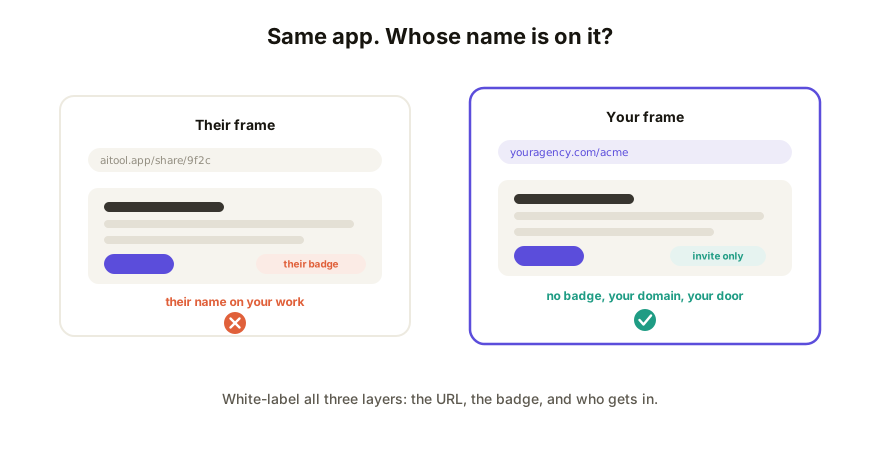
For a traditional deliverable, white-labeling is mostly a logo swap. For an AI-built page or app, the tool's fingerprints sit in three separate layers, and you have to clear all of them:
- The URL. If the address bar says
aitool.app/share/9f2c, the deliverable belongs to that domain in every way that matters to the client: the bookmark, the forwarded link, the browser history. Your name appears nowhere in the one string everyone copies. - The frame. Most generation tools stamp a "Made with X" badge on anything they host. It's fair marketing for them and quiet attribution theft from you, because the client reads it as "this is who really did the work."
- Access. White-label delivery means you decide who opens it. If access runs through the vendor's account system, sharing rules, and public toggles, you're renting the front door to your own deliverable.
Clear all three and the client experiences your work at your address on your terms. Miss one and there's a stranger's name somewhere in the delivery.
Why the vendor's share URL undercuts agency work
A freelancer or agency sells judgment, not typing, and the delivery moment is where that judgment gets judged. When the client opens lovable.app/whatever or a Claude artifact link, they see another company standing between you and the work. Some will wonder what they're paying you for. Others will just remember the tool's name instead of yours, and next quarter they'll try prompting it themselves.
There's also a practical layer: vendor share links fail clients outright often enough, with sign-in walls and sharing limits that vary by tool and by the viewer's account. A white-label link sidesteps both problems at once. It carries your brand, and it opens for anyone.
To be fair to the generation tools: their share links can't do this, by design. Claude, ChatGPT, Gemini, Lovable, and v0 host shared output on their own domains because the share page is part of their product surface. That's a reasonable choice for them. It just means white-labeling has to happen one step after generation, wherever the HTML gets published.
How to white-label the deliverable, step by step
- Get the app out of the generator. Ask your tool for one self-contained HTML file, or copy the code it already shows. This works the same whether it came from Claude, ChatGPT, Gemini, Lovable, or v0.
- Publish it to a host you brand. Paste the HTML into a collaboration layer and put the live page on your own domain, or a per-client subdomain like
acme.youragency.comif you deliver a microsite per client. - Remove the platform badge. The page frame should carry your framing or none at all. No "Made with" chip in the corner.
- Gate access per client. Password-protect the link or make it invite-only, so each client's work is visible to that client and nobody else. They still shouldn't need an account to view it.
- Keep delivering on the same link. Edit copy and styling directly on the live page, republish deeper changes from your AI tool, and let version history hold the record. Feedback rounds run through comments pinned to the page, under your brand the whole way.
How Coedit fits
Coedit is the publish step. Paste the HTML from whatever tool built it and you get a live link a client can open and comment on with no account. On Pro ($12 per editor per month) the white-label part switches on: the page serves from your custom domain, the "Made with Coedit" badge comes off, and links can be password-protected or invite-only per client, with full version history behind them. The free tier keeps a light badge on the page, which is fine for internal rounds and honest about the trade. Coedit never generates anything; it takes the app your tool produced and makes the delivery read as yours.
FAQ
Q: Can I remove the "Made with" badge from an AI-built app? A: Not on the generation tool's own share page; the badge and domain are part of their product. Export the HTML and publish it elsewhere. On Coedit, the free tier keeps a light badge and Pro removes it entirely.
Q: Do I need the client's domain to white-label the deliverable?
A: No. A subdomain of your own agency domain, like acme.youragency.com, is the common pattern and stays fully under your control. Use the client's domain only when they want the work to live there permanently.
Q: Will my client need an account to view a white-labeled app? A: They shouldn't, and on Coedit they don't. Viewing and commenting need no account even on password-protected or invite-only links. Accounts stay on your side of the delivery.
Q: Is white-labeling dishonest about using AI? A: No. It's the same as removing a subcontractor's watermark from work you're accountable for. You chose the tools, directed the output, and stand behind the result. What you tell the client about your process is a separate, honest conversation.