TL;DR
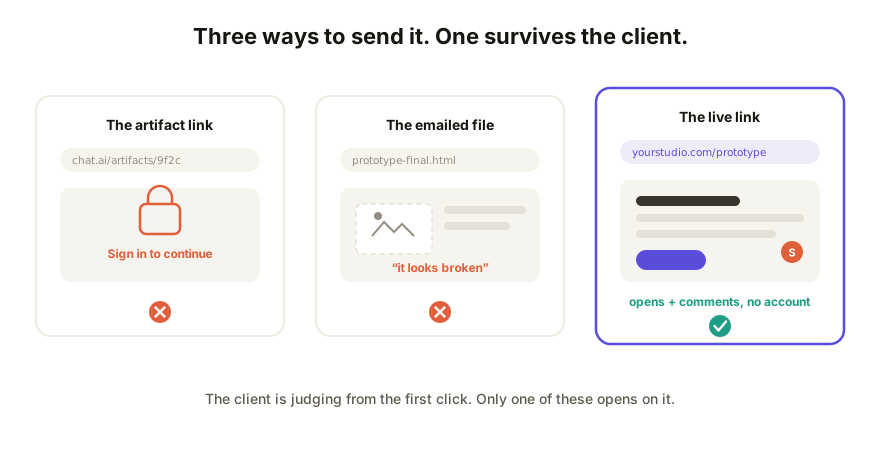
Your client will not make an account to look at your work, and they shouldn't have to. That rules out sending the artifact or canvas link from your AI tool, which lands on a sign-in wall for anyone outside it. Emailing the HTML file breaks half the time, and a screen recording isn't the prototype, it's a movie of it. The fix is a collaboration link: publish the prototype's HTML to a live URL that opens for anyone, takes comments in place, and updates without resending anything.
Why the obvious options fail with clients
The audience matters here. A teammate will humor a weird link. A client is judging you from the moment the thing does or doesn't open, and every extra step costs you.
- The artifact / canvas link. Claude artifacts, ChatGPT canvases, and Gemini apps live inside your account's walls. Share the link and an outsider gets a login page, not your prototype. Even when a public toggle exists, the page arrives on the AI vendor's domain with the AI vendor's framing, and the client can't respond on it.
- The emailed HTML file. It can work, and it often arrives broken instead: images referenced from your machine go missing, some mail clients block the attachment outright, and the client double-clicks into a wall of code or a security warning. Even the good case gives you no comments, no updates, no idea if they opened it.
- The screen recording. A Loom is honest work, but it demos the prototype instead of handing it over. The client can't click the thing, and their feedback comes back as timestamps.
What client-ready sharing actually requires
Hold any option against this checklist. It's short, and options one through three each fail most of it:
- Opens in one click. No account, no download, no install, on their phone if that's where they are.
- Feedback lands on the prototype. A comment pinned to the button they mean beats "the thing on the left" in an email, every time.
- Updates in place. After their feedback, the same link shows the new version. No v2-final-FINAL attachments.
- Reads as yours. Your framing around it, ideally your domain on it, no AI vendor between your work and your client.
The collaboration-link way, step by step
- Get the prototype's HTML out of your AI tool: ask for one self-contained file, or copy the code it already shows. This works the same across tools.
- Paste it into a collaboration layer and publish. You get a live URL where the prototype actually runs, sandboxed, in the client's browser.
- Send that one link. The client opens it, clicks around, and leaves comments pinned to specific elements, all with zero signup.
- Work the feedback: change copy and styling directly on the live page, republish deeper changes from your AI tool to the same link, and let version history keep the record of what changed when.
How Coedit fits
Coedit is that collaboration layer. Paste the HTML from whatever tool built it, share one live link that opens for anyone, and take the client's comments on the page itself, with no account required of them, ever. On Pro the link lives on your own domain, invite-only or password-protected when the work is sensitive, with no Coedit badge, so the prototype reads as yours from the URL down. It doesn't generate or change your prototype; it makes the one you built arrive properly. If this is a regular part of how you work, the freelancer's guide to AI-built client deliverables covers the full workflow.
FAQ
Q: How do I share an AI prototype with a client without them creating an account? A: Publish the prototype's HTML to a live link with a collaboration tool rather than sharing your AI tool's artifact link. The client opens the URL in one click and can comment in place; accounts stay on your side only.
Q: Why can't my client open my Claude artifact link? A: Artifact links resolve inside Anthropic's account system. Someone without a suitable account gets a sign-in page instead of your work. The prototype needs to be republished somewhere that serves it to anyone with the link.
Q: Is it safe to put a client prototype on a public link? A: An unguessable URL keeps casual traffic out, but for work carrying pricing or client data use password protection or invite-only access, so only the people you name can open it.
Q: How do I update the prototype after the client gives feedback? A: Small changes (copy, styling) are editable directly on the live page. Bigger changes go back through your AI tool and republish to the same link, so the client never juggles versions, and history keeps each round.