TL;DR
Claude's built-in artifact sharing is genuinely good for one job: letting someone see what you made, fast. Since September 16, 2026 it also does comments and edit roles, so the old "view-only" complaint is out of date. The limits that remain are structural: new artifacts need a Claude sign-in to open, links live on Claude's domain, edits run through Claude, and there's no version history for the shared thing. Below is each limit, when it bites, and the alternative that clears it.
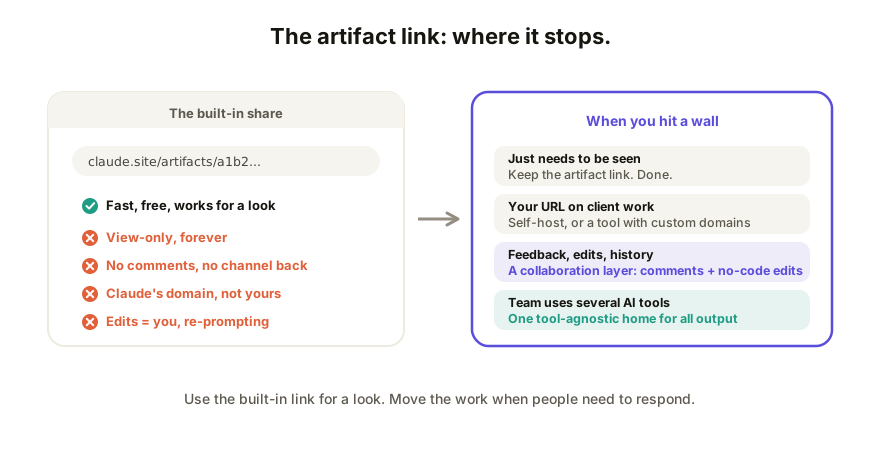
What the built-in share does well
Share an artifact and Claude gives you a link, working interactivity included. Zero setup. For a new artifact, the people opening it need to be signed in to Claude (legacy artifacts published before September 16 still open with no account). The full rules are in what changed on September 16. For "here's what I mean" in a chat or a demo in a meeting, use it and move on. (The basics, plus the export path: how to share an app you built with Claude.)
The walls appear when the other person needs to do more than look.
The limits, one by one
1. Everyone needs a Claude account. New artifacts have view, comment and edit roles, but "anyone with the link" means anyone signed in to Claude, and invitees from outside your org need an account on the invited email (up to 50 per artifact). A client who has never used Claude hits a sign-in screen. Clearing it means hosting the app on a surface with no-code editing and no account to open it.
2. It lives on Claude's URL. The link is Claude-branded, which is fine for a scratch demo and wrong for anything client-facing: a proposal, a deliverable, a tool with your name on it. Clearing it: self-host the exported HTML, or use a sharing tool with custom-domain support.
3. Feedback stops at the account line. The Commenter role exists now, but only for people signed in to Claude. Everyone else reacts wherever they can reach you (Slack, email, a meeting), as prose descriptions of page locations, and you carry that back into your Claude session by hand. Clearing it: comments pinned to the live page.
4. Edits still run through Claude. The Can edit role lets a signed-in teammate change the artifact, but the change is made by prompting Claude, and a stakeholder who just wants to fix a word has to do it through the AI. That's the relay loop: fine for one rare fix, a bottleneck when three stakeholders each want word changes during review week.
5. No history for the shared artifact. Iterating in chat leaves no rollback trail on the published thing: no "what did the client see on Tuesday," no undo to the version before the model rewrote your layout. Clearing it needs real version history on the shared artifact itself.
6. It's Claude-only. Obvious but consequential: the mechanism can't share your teammate's ChatGPT canvas or a v0 export. A mixed-tool team ends up with three different sharing systems (the decoder across tools), which in practice means none.
So what do you use instead?
Match the alternative to the wall you actually hit:
| The wall you hit | The move |
|---|---|
| Just need it seen, none of the above | Keep the artifact link |
| Claude URL on client work | Self-host the HTML, or a tool with custom domains |
| Need feedback on the thing | A surface with element-pinned comments |
| Others need to edit | A surface with no-code editing + history |
| Mixed AI tools on the team | One tool-agnostic layer for all output |
Self-hosting (Netlify and friends) clears wall 2 and nothing else: still no comments, no shared editing, no history, and every update is a manual re-upload. The remaining walls are all the same shape, which is why the real alternative to a share link isn't a better host; it's a collaboration layer.
How Coedit fits
Coedit clears walls 1 through 6 with one move: export the artifact's HTML, paste it in, share the live link. Viewers and commenters need no account; people you allow edit copy and styling without code; every human and agent change lands in one version history with rollback; paid plans put the link on your own domain; and the same flow works for ChatGPT, Gemini, Lovable, v0, or hand-written HTML. Claude stays your builder; the shared, collaborative copy lives at one neutral address.
FAQ
Q: Can someone edit a Claude artifact I shared with them? A: Yes, if they're signed in to Claude and you give them the Can edit role. A copy they make themselves forks into their own chat and doesn't change yours. For people with no Claude account, shared editing requires hosting the app on a collaboration surface.
Q: Can I put a Claude artifact on my own domain? A: Not via the built-in link, which lives on Claude's URL. Export the HTML and self-host it, or publish it through a sharing tool that supports custom domains.
Q: Do people need a Claude account to view my artifact link? A: For a new artifact, yes: "anyone with the link" means anyone signed in to Claude. Legacy artifacts published before September 16, 2026 still open without an account, and so do Claude Code public links.
Q: How do I collect feedback on a shared Claude artifact? A: Signed-in people can use the Commenter role. For everyone else, either accept scattered chat-and-email reactions, or move the artifact to a surface where comments pin to the exact element on the live page.