TL;DR
A client microsite is one page with one job: a campaign, an event, an offer, a launch teaser. That doesn't justify a CMS project. Brief an AI tool with the client's copy and brand colors, iterate until one self-contained HTML file looks right, publish it to a live link, and point a real domain at it. Done in an afternoon.
When a microsite is the right call
The test is three questions. Does the page have a single purpose? Will it retire in weeks or months, not years? Can it say everything on one page? Three yeses means microsite: a campaign page for a seasonal push, an event page with the schedule and an RSVP button, a limited offer with one form, a teaser for a product that launches next month.
A no on any of them means you're building something else. Pages that need navigation, a blog, or content from three departments are a site project. A place where the client logs in to check ongoing work is a client portal, which is its own job. And what you're making here is the simplest kind of AI-built page: one HTML file that carries everything it needs.
The afternoon, hour by hour
This is the honest version, including the boring parts.
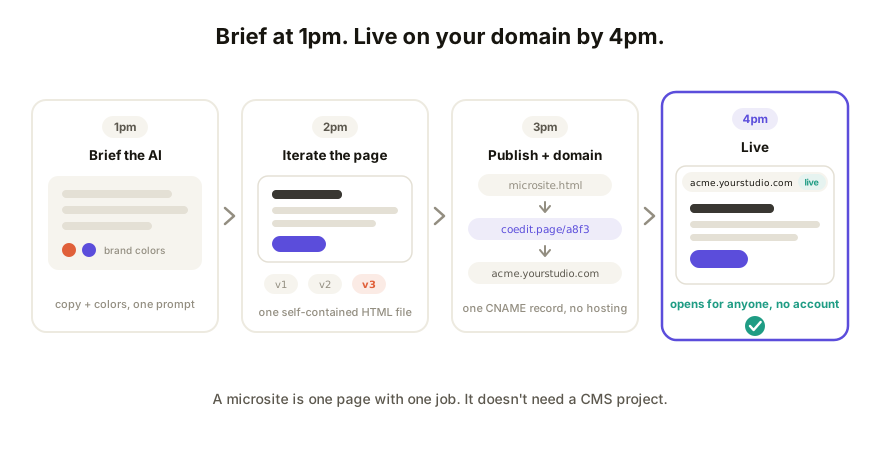
1pm. Brief your AI tool. Paste the client's copy, their hex codes, and a note on tone into Claude, ChatGPT, Gemini, Lovable, or v0, whichever you already use. Ask for one self-contained HTML file: styles inline, no images referenced from your machine. That one instruction is the difference between a page that travels and a file that looks broken the moment it leaves your laptop.
2pm. Iterate the page. A few rounds on the hero, the spacing, and how it holds up at phone width, because that's where the client will open it. Stop at good enough. Copy and styling stay editable on the live page later, so you're not sealing anything today.
3pm. Publish and wire the domain. Paste the file into a collaboration layer and you have a live URL, the same move as sharing any HTML file. Then the domain: pick a subdomain like acme.yourstudio.com, add one CNAME record at your registrar, and the full domain walkthrough covers the details. DNS usually settles in minutes, occasionally an hour, which is why this step is at 3pm and not 4:55.
4pm. Send it. The client opens the link on their phone, no account, and leaves comments pinned to the parts they mean. You fix the headline on the page itself, and the campaign link goes out with their name on the URL and yours nowhere in sight.
Why a CMS is overkill for one page
A CMS earns its keep on sites with many pages, many authors, and a long life. A microsite has none of those, so every part of the CMS bill is pure overhead.
| CMS build | Single-file microsite | |
|---|---|---|
| Setup | Hosting, theme, plugin config | Paste one HTML file |
| Maintenance | Core updates, plugin patches | None |
| Edits | Log in, find the template | Change the text on the live page |
| After the campaign | A stale install to secure or tear down | Unpublish the link |
Six weeks of campaign doesn't repay a day of WordPress setup plus a standing maintenance duty. One file, one link, one DNS record does the same job and leaves nothing behind to patch.
Updating it after launch
Launch isn't the last edit, and that's fine. Copy and styling changes happen directly on the live page: fix the date, swap the headline, nudge a color, and it's live at the same URL. Deeper changes, a new section or a reworked layout, go back through your AI tool and republish to the same link, so the URL on the client's ads never changes. Version history keeps every round, and rollback means the client asking for Friday's hero back is a click, not an argument.
If the client wants more than one page
A Coedit project is one page plus its hosted assets. A microsite with a home page, a schedule, and an RSVP page is three projects that link to each other, each on its own URL under the same domain. That's workable up to a handful of pages. Past that, you're describing a website, and it deserves a site build instead.
How Coedit fits
Coedit is the publish-and-review half of this afternoon. Paste the HTML from whichever tool built it and you have a live link that opens for anyone, no account required, where the client comments on the draft before anything goes public. Pro, at $12/editor/month, is what makes it client-grade: the page lives on your own domain, the Coedit badge comes off, and private or password links keep the draft between you and the client until launch day. Coedit never writes or changes the page. It's where the page lives, gets reviewed, and stays current, whatever built it.
FAQ
Q: Can I put a client microsite on my own domain without running a server? A: Yes. Publish the HTML file to a hosted live link, then add one CNAME record pointing a subdomain (like acme.yourstudio.com) at it. No server, no deploy pipeline, no hosting account. On Coedit, custom domains come with Pro at $12/editor/month.
Q: Do I really need a CMS for a one-page campaign site? A: No. A CMS pays off when many people edit many pages over years. For one page that lives a few weeks, it adds setup, hosting, and patching for nothing. A single self-contained HTML file on a live link does the job with zero maintenance.
Q: How does the client review the microsite before it goes live? A: Send them the draft link. It opens in one click, no account, and they leave comments pinned to the exact element they mean. With a private or password link on Pro, only the people you choose can see it until you launch.
Q: What if the microsite needs three pages instead of one? A: A Coedit project is one page plus its assets, so a three-page microsite is three projects linked to each other, each on its own URL under your domain. That scales to a handful of pages; beyond that, plan a proper site.