TL;DR
Claude is a serious tool for client work: a brief goes in, a working interactive page comes out. Delivery is the gap. Get the HTML out of the artifact, publish it to a live link the client opens with no account, take comments pinned to the page, edit copy in place, and republish deeper changes from Claude to the same URL.
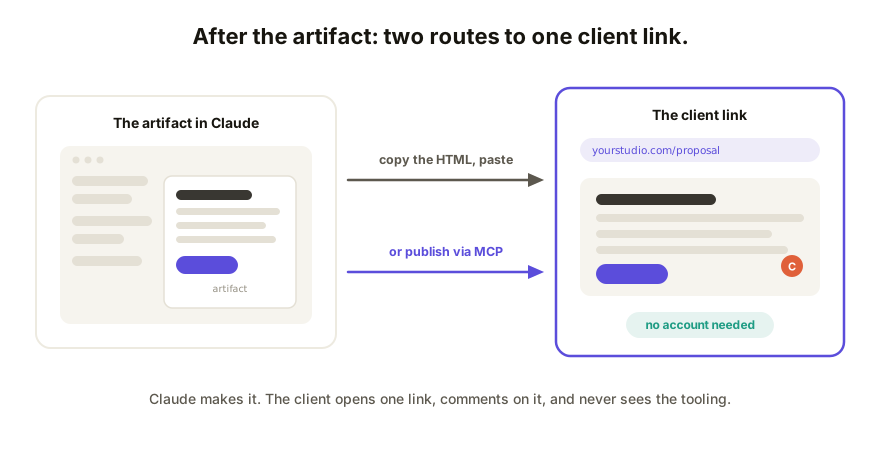
Why Claude earns its place in client work
If you freelance or consult, Claude is probably already doing real billable work: a pricing calculator from a paragraph of rules, a proposal that reads like a microsite instead of a PDF, a report with charts the client can actually poke at, a prototype that settles a debate in one click. The artifact pane is the quiet hero here. You describe the deliverable, and you get a working interactive page, not a mockup of one. That's a genuine edge over a deck and a Word doc, and nothing below argues you should give it up.
The gap shows up at the last step: getting that page in front of the client in a way that looks professional and collects a decision.
Where the artifact stops being enough
Artifact sharing is built for people inside the tool's walls, and a client is the definition of someone outside them. The full list of limits is its own post; for client work, four of them bite hardest:
- Account context. Viewing a published artifact generally works, but that's where it ends. Anything past looking, and anything you didn't explicitly publish, needs the right Claude account context on the client's side, which you can't count on and shouldn't have to explain.
- Claude's domain, Claude's framing. The link announces the tool before it shows your work. Fine for a scratch demo between builders, wrong for a proposal with your name on it.
- No pinned feedback. There's no way for the client to attach a comment to the button they mean. Reactions arrive as prose in email, and you translate "the thing near the top" back into the page by hand.
- No white-label. No custom domain, no removing the vendor branding, no password on sensitive numbers. Client deliverables usually want all three.
None of that is a flaw in Claude as a maker. It's the difference between a workshop and a storefront.
What to do after the artifact
- Get the HTML out. Ask Claude for one self-contained HTML file with the styles and scripts inline, or copy the artifact's code directly. If you're staring at a raw HTML file wondering what to do with it, that file is the deliverable, one step from done.
- Paste it into a collaboration layer. The page gets republished as a live, sandboxed URL where it actually runs.
- Send one link. The client opens it in a browser, on their phone if that's where they are, with no account and no download.
- Take comments on the page. Feedback pins to specific elements, so "make this headline shorter" points at the actual headline.
- Edit copy and style directly. Typos, wording, colors: fix them on the live page and move on. No round trip through a prompt for a two-word change.
- Republish deeper changes to the same link. Logic and layout go back through Claude, then the new HTML replaces the old at the same URL. The client never juggles versions; history keeps each round with rollback.
Steps 1 and 2 are the whole trick, and they're covered end to end in how to share an app you built with Claude.
The power-user path: let Claude publish it
Copying HTML by hand works. If Claude sits in the middle of your workflow all day, you can skip the copying: through the Coedit MCP server, Claude publishes and updates projects directly, reads the client's comments and the version history, and pushes reviewable changes to the same live link. Agent edits land in the same version history as your own, so "who changed the pricing table on Thursday" has one answer whether it was you or the model, and rollback covers both.
If the client insists on another tool
Some clients arrive with a ChatGPT canvas or a Gemini app and want it treated the same way. Good news: the workflow above doesn't care. Every one of these tools can hand over its HTML, and from step 2 onward the process is identical. The tool-by-tool decoder covers how each one exports. Keep making things in whichever tool fits the job; the delivery layer stays the same.
That's the honest framing for all of this: Claude for making, a collaboration layer for delivering. Neither replaces the other.
How Coedit fits
Coedit is that delivery layer. Paste the artifact's HTML (or let Claude publish through the MCP server) and you get one live link where the client views, clicks, and comments with no account, and several people can pile in at once without stepping on each other (47/47 concurrency tests). You edit copy and styling on the page itself; deeper changes republish to the same URL; version history with rollback covers every human and agent edit. Free covers 10 projects. Pro ($12 per editor per month) adds the client-facing polish: your own domain, no badge, private and password-protected links, full history. It never generates or rewrites your work; it makes the work you built in Claude arrive like a deliverable, not a link to a tool.
FAQ
Q: Can I just send my client the Claude artifact link? A: For a quick "look at this," a published artifact link often opens fine. But it lives on Claude's domain with Claude's framing, collects no comments, and anything beyond viewing depends on the client's own account context. For a paid deliverable, republish the HTML to a link you control.
Q: How do I get the HTML out of a Claude artifact? A: Ask Claude to produce the artifact as one self-contained HTML file with all CSS and JavaScript inline, or copy the code straight from the artifact pane. Either way you end up with a single file that runs anywhere a browser does.
Q: Does my client need an account to comment? A: No. Viewing and commenting on a Coedit link require no account. Comments pin to the exact element the client means, which is most of what makes the feedback usable.
Q: What happens when the client asks for a bigger change? A: Take it back to Claude, regenerate the HTML, and republish to the same link, by paste or through the MCP server. The URL the client has doesn't change, and version history keeps each round in case you need to show or restore an earlier one.