TL;DR
An HTML file is a web page saved as a file. HTML (HyperText Markup Language) is the format every website is written in; your browser's job is to read it and draw the page. The AI gave you one because you asked for something interactive (a tool, a planner, a calculator), and a web page is the one format that runs on every device with zero installs. It's normal, it's safe to open if you made it, and it works.
HTML, in plain terms
Every page you've ever visited (this one included) reached your browser as HTML: text with markers that say "this is a heading," "this is a button," "this bit is a table." The browser reads those markers and draws the page.
Usually that file arrives over the internet from a server, so you never see it as a file. But it can just as easily sit on your desktop. Double-click it and the browser opens it exactly the same way. Same format, different delivery.
One useful mental model: an HTML file is to a web page what a .jpg is to a photo. Not a link to the thing, not a shortcut. The thing itself.
Why the AI handed you one
When you ask an AI for something you can click (a budget tracker, a quiz, an interactive chart), it has to pick a format the result can actually run in. The candidates are short: a native app needs installing and differs per device; a spreadsheet can't do custom interfaces; a document isn't interactive at all. A web page runs on every phone, laptop, and tablet ever made, with no install, so that's what every AI tool converges on.
The tools wrap it in their own vocabulary (Claude calls it an artifact, ChatGPT a canvas, Gemini an app; here's the decoder), but when you download the result, the costume comes off and it's an .html file.
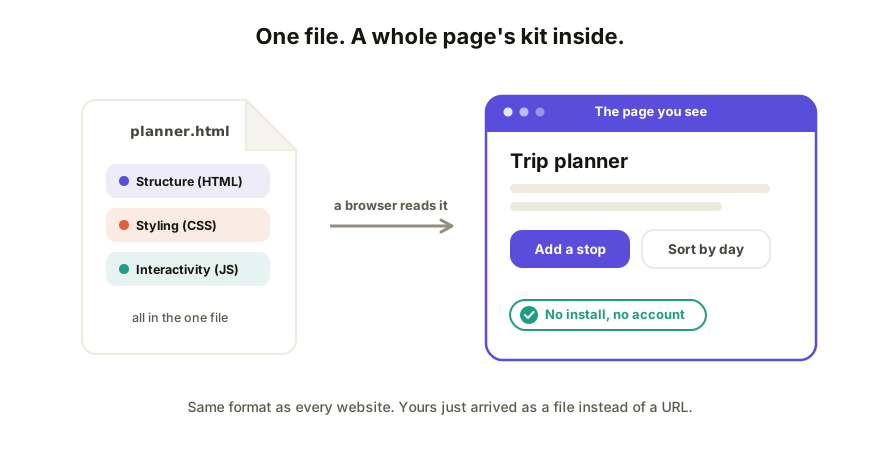
What's inside is one page's whole kit, usually in a single file:
| Part | What it does |
|---|---|
| Structure (HTML) | What's on the page: headings, buttons, tables |
| Styling (CSS) | What it looks like: colors, fonts, layout |
| Interactivity (JavaScript) | What it does when clicked: calculate, filter, respond |
Is it safe? And did I break something?
Two worries, both fair:
Safety. An HTML file is only as trustworthy as where it came from. One your own AI session just built for you is fine to open. The same caution as any file applies to .html attachments from strangers, which is exactly why email clients treat them warily.
The "wall of code" scare. If you opened the file and saw text like <div class=... instead of a page, nothing is broken. The file opened in a text editor instead of a browser, which shows the recipe instead of the meal. Right-click, "Open with," pick Chrome, Safari, Edge, or Firefox. Full walkthrough here.
What to actually do with yours
- Just look at it: double-click. It opens in your browser. That's the whole move. (More detail.)
- Keep it: it's a normal file. Rename it, back it up, duplicate it; the
.htmlending is the only part that matters. - Send it to someone: here's the catch. The file opens fine on your machine, but attachments get flagged by mail clients and fumbled by phones. The reliable way to share a web page is to put it on the web and send a link, which takes about a minute. (Three ways, compared.)
How Coedit fits
Coedit is the "put it on the web" step built for exactly this file: paste the HTML in and you get one live link that opens anywhere, where people can comment on the exact element they mean and, if you allow it, edit without touching code. It works with HTML from Claude, ChatGPT, Gemini, Lovable, v0, or a text editor; viewing and commenting need no account.
FAQ
Q: What does HTML stand for? A: HyperText Markup Language. "Markup" is the useful word: it's text marked up with labels that tell a browser what each piece is, so it can draw the page.
Q: Is an HTML file the same as a website? A: It's one page of one, stored as a file. A website is usually many HTML pages served from a server. Your single file becomes a "real" web page the moment something serves it at a URL.
Q: Why does the file open as code instead of a page? A: It opened in a text editor rather than a browser. Right-click the file, choose "Open with," and pick your browser. The file is fine; only the opener was wrong.
Q: Can I edit an HTML file? A: Yes. Technically-inclined people edit the text directly. If that's not you, ask the AI that made it to change it, or put it in a tool that supports visual, no-code editing.