TL;DR
Don't email the file. An HTML file opens fine on your computer, but the moment you attach it to an email or drop it in a chat, you're relying on the other person's device, mail client, and patience. The reliable way to share an HTML page is to put it on the web and send a link. That takes about a minute, and there are free ways to do it.
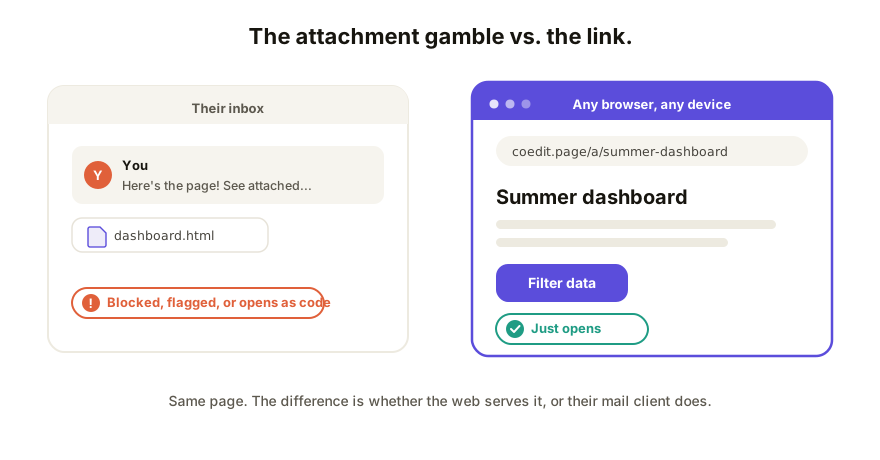
Why sending the file usually goes wrong
An HTML file is a web page (here's what it actually is, if you're new to this). Web pages are meant to be served by the web, not passed around like documents. When you send the raw file instead:
- Email clients treat it as a threat. HTML attachments are a classic phishing vehicle, so Gmail and Outlook often warn on them, preview them as a wall of code, or block them outright.
- Phones fumble it. On iOS and Android, tapping an
.htmlattachment frequently opens a text preview or a "no app can open this" prompt rather than the browser. - Anything the page loads separately breaks. If your page references images or fonts as separate files, the copy you sent doesn't include them. The other person gets the layout with holes in it.
- You've forked it. The moment you hit send, there are two copies. Fix a typo and the version in their inbox is stale.
None of this is the other person's fault, and walking them through "download it, then right-click, then open with Chrome" is a support call you don't want.
Option 1: attach it anyway (when that's fine)
If the recipient is technical, the page is fully self-contained, and it only needs to be seen once, an attachment works. Zip it first so the mail client doesn't mangle it, and tell them to unzip and double-click. That's the whole method. It's fine for sending a colleague a quick test file; it's the wrong tool for anything a client or a group will look at.
Option 2: put it on a static host
Static hosts serve plain HTML for free, and the simplest ones are genuinely simple:
- Go to a static host with drag-and-drop deploys (Netlify Drop is the classic; Vercel and Cloudflare Pages work too, with a bit more setup).
- Drag your HTML file (or its folder, if it has images) into the upload area.
- Copy the URL it gives you and send that instead of the file.
Now it opens like any website, on any device, no warnings. The trade-offs: the URL is a random subdomain unless you configure a custom domain, updating means re-uploading by hand, and the page is public to anyone who finds the link, with no way for viewers to leave feedback on it.
Option 3: turn it into a live, collaborative link
If you're sharing the page to get a reaction (a review, edits, a sign-off), hosting alone still leaves you collecting feedback by email. The third option is a collaboration link: paste the HTML into a tool like Coedit and share the URL it gives you.
The difference from plain hosting is what the other person can do when they arrive: open it with no account, comment on the exact element they mean, and (if you allow it) edit the copy or styling directly, with every change landing in one version history. When you update the page, the same link shows the new version, so there's no stale copy in anyone's inbox.
Which one should you use?
| Your situation | Best way to share |
|---|---|
| One technical recipient, one quick look | Zip it and attach it |
| It just needs to be publicly viewable | Static host, send the URL |
| A client or team needs to react to it | A collaboration link |
| You'll keep iterating after you share | A collaboration link (one URL, always current) |
The pattern: the more the other person needs to do, the more you want a link instead of a file, and a collaborative link instead of a static one. If the page came out of an AI tool, there's a fuller walkthrough in how to share an app you built with Claude; the logic is the same for any HTML.
How Coedit fits
Coedit is the third option, built out properly. It doesn't generate pages (your AI tool or your own hands already did that); it takes the HTML you have and turns it into a live link with comments, no-code editing, and version history across human and agent edits. Viewing and commenting need zero accounts. It works the same whether the file came from Claude, ChatGPT, Gemini, Lovable, v0, or a text editor.
FAQ
Q: Why does my HTML file look broken when someone else opens it? A: The file probably references images, stylesheets, or scripts stored as separate files on your computer. The copy you sent doesn't carry them along, so the layout arrives with pieces missing. Hosting the page (options 2 and 3) serves everything together and fixes this.
Q: Can people open an HTML file on a phone? A: As an attachment, unreliably; many phones show code or refuse. As a hosted link, yes, it opens in the browser like any website.
Q: Does the other person need special software? A: No. Any browser can open HTML. The problems come from delivery (mail clients and phones handling attachments badly), not from the format.
Q: How do I let someone edit the page, not just view it? A: A file or a static host can't do that safely. Use a collaboration tool where you control who can edit, changes are tracked, and non-coders can edit text and styles without touching the markup.