TL;DR
Your page didn't get corrupted. An HTML file often refers to other files (images, styles, fonts) that live on your computer or on the AI tool's servers, and when you sent the file, those references went along but the files they point to didn't. On the other person's machine, every reference comes up empty: broken image icons, missing styling, dead layout. The fix is either to make the file truly self-contained, or to stop sending files and share a hosted link.
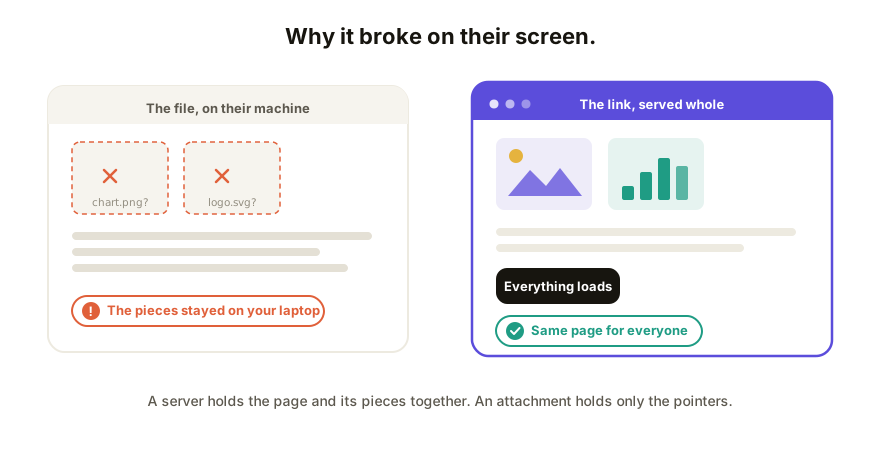
What's actually happening
An HTML file describes a page, and for anything it doesn't contain, it points elsewhere: <img src="chart.png"> means "fetch chart.png and put it here." That works while the file sits next to chart.png on your machine, or while the page loads assets from a server you're logged into.
Email the HTML file alone, and the recipient's browser dutifully follows every pointer into nothing. Each miss is one hole in the page:
| What they see | What it means |
|---|---|
| Broken image icons | The images were separate files that stayed on your machine |
| Plain, unstyled text | The styling was in a separate .css file that didn't travel |
| Buttons that do nothing | The interactive code was in a separate .js file, same story |
| Blank page or login prompt | The page loads pieces from the AI tool's servers, behind your session |
That last row is the sneaky one with AI output: the preview inside Claude or ChatGPT sometimes leans on assets or libraries fetched from the internet. On your screen, inside your session, everything resolves. As a loose file on someone else's laptop, it may not.
Fix 1: make the file self-contained
If it must stay a file, everything the page needs has to live inside the one file: styles in a <style> block, code in a <script> block, images embedded as data URIs.
The good news: you rarely have to do this by hand. Ask the AI that built the page:
"Give me this as a single self-contained HTML file, with all CSS and JavaScript inline and images embedded, no external references."
Then test it honestly: put the file somewhere with no access to your originals (a different user account, or a machine that isn't yours) and open it. If it survives that, it'll survive email. If the page has many images, expect a big file; embedding trades size for portability.
This fix has a ceiling, though. Even a perfectly self-contained file still travels as an attachment, and attachments get flagged by mail clients and mangled by phones (the delivery problem, separately). You've fixed the holes, not the handoff.
Fix 2: stop sending the file; send a link
The web solved this problem the day it launched: a server holds the page and its pieces, and every visitor gets all of it, assembled the same way. Host the page anywhere (a static host if it just needs to be visible, a collaboration tool if people need to respond) and share the URL instead of the file.
One upload, and the page renders identically on every device, because everyone's browser fetches the same pieces from the same place. And you get the side benefits files can't offer: fix a typo and the same link shows the fixed version; no stale copies in inboxes. This is the same fork covered in how to share an app you built with Claude: file thinking versus link thinking.
Which fix, when
- One technical recipient, offline use, archival: self-contained file.
- Anyone else, any feedback expected, any iteration coming: a link.
Rule of thumb: if you'll ever send a second version, use a link. The second version is where file-sharing falls apart, because now two copies disagree and neither of you knows which is current.
How Coedit fits
Coedit is the link fix with the collaboration built in: paste your HTML (from Claude, ChatGPT, Gemini, Lovable, v0, wherever) and it's served whole at one live URL. Nothing left behind on your laptop, no session-locked assets, and the same link stays current as you republish. Viewers need no account, comments pin to the element they're about, and every change lands in one version history.
FAQ
Q: Why do images break when I email an HTML file? A: The images usually aren't inside the HTML file; the file just holds pointers to image files that stayed on your computer. The recipient's browser follows the pointers and finds nothing. Embed the images in the file, or host the page and share a link.
Q: The page works for me but shows a blank page for others. Why? A: It likely loads pieces from the internet, sometimes from the AI tool's own servers behind your login. Your browser has your session; theirs doesn't. Ask the AI for a fully self-contained version, or host the page.
Q: How do I make an HTML file self-contained? A: Ask the AI that generated it to inline all CSS and JavaScript and embed images as data URIs, in one file with no external references. Then test it on a machine (or account) that has no access to your original files.
Q: Is there a way to avoid this whole class of problem? A: Yes: share links, not files. A hosted page serves everything together, so what you see is what everyone gets, on every device, every time.