TL;DR
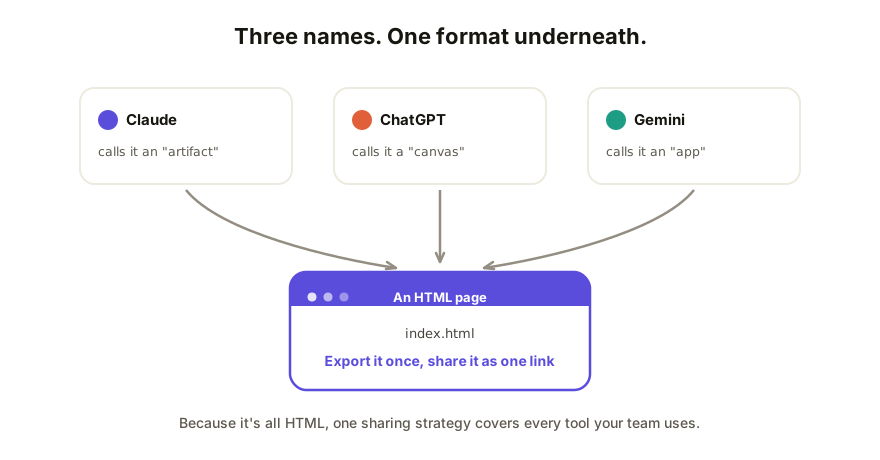
They're all the same thing wearing different names. A Claude artifact, a ChatGPT canvas, and a Gemini app are each the tool's word for "the interactive thing the AI built for you," and under the hood it's almost always a web page: HTML. Each tool has a built-in share option that's quick and tied to that tool's own interface, and all three support the same better path: get the HTML out and share it as its own live link.
The decoder table
| Tool | What it calls the output | What it actually is | Built-in sharing |
|---|---|---|---|
| Claude | Artifact | An HTML page (or document/code) in a side panel | Share by link or email (Claude sign-in needed) |
| ChatGPT | Canvas | A document or code file in a side panel | Share the conversation, read-only |
| Gemini | Canvas / app | A document or small web app in a side panel | Share a link tied to Gemini |
The vocabulary is branding. The format underneath is the web's: when any of these tools builds you something clickable, it writes HTML. That's why one sharing strategy covers all three, and why you're not locked in when your team uses a mix.
Sharing from Claude
Claude's artifacts have the most direct built-in path: open the artifact, use the Share option, and send the link. For a new artifact the recipient needs to be signed in to Claude (their own account, not yours); legacy artifacts published before September 16, 2026 open with no account.
The catch is what they can't do: the viewer needs a Claude sign-in, the link lives on Claude's domain, and feedback from anyone outside Claude comes back to you by message. The full walkthrough, including hosting it yourself, is in how to share an app you built with Claude.
Sharing from ChatGPT
ChatGPT shares the conversation as a snapshot. On a personal account anyone with the link can open it; on a Business, Enterprise or Edu workspace only members of that workspace can, so a client outside your company can't. OpenAI's shared-links page doesn't name canvas content, so check the preview shows it. Fast, but the other person is reading your chat, not using a page, and the snapshot goes stale as you keep working. If the canvas holds a web page, copy or download the HTML and share that instead. Step-by-step details: how to share a ChatGPT canvas.
Sharing from Gemini
Gemini's canvas can preview small apps and pages, and sharing produces a link associated with Gemini. Same shape as the others: quick for a look, limited for collaboration. And same escape hatch: ask for the result as a single HTML file, download it, and it's yours to share anywhere.
The one path that works for all three
Because everything above is HTML underneath, the tool-agnostic route is always available:
- Get the HTML out. Download it, copy it, or ask the AI: "give me this as one self-contained HTML file." (If a loose
.htmlfile is new territory, here's what it is and what to do with it.) - Give it a home on the web. A static host if it only needs to be seen; a collaboration tool if people need to respond to it.
- Send one link. It opens on any device, regardless of which AI made the page or whether the recipient has ever used one.
This is the move that keeps a mixed-tool team sane. Your designer prototypes in Claude, your analyst builds in ChatGPT, someone else tries Gemini, and everything still lands in the same place, gets reviewed the same way, and lives at stable URLs.
How Coedit fits
Coedit is that landing place. It doesn't care which tool made the page and it never generates anything itself: it takes the HTML from any of them and turns it into a live link with element-level comments, no-code editing, and one version history across human and agent edits. Viewers and commenters need zero accounts. The artifact/canvas/app naming mess stops mattering the moment the work has its own link.
FAQ
Q: Are a Claude artifact and a ChatGPT canvas the same thing? A: Functionally, yes: each is the tool's container for substantial output it built for you, shown beside the chat. The interfaces differ, but interactive output is HTML in both, which is why both can be exported and shared the same way.
Q: Can I open a Claude artifact in ChatGPT, or the reverse? A: Not directly; each tool's container is proprietary to it. But the HTML inside is portable. Export it, and any browser (and any collaboration tool) can use it, no matter where it goes next.
Q: Do shared links from these tools require an account to view? A: ChatGPT's shared conversations generally open without one. New Claude artifacts need the viewer to be signed in to Claude. Doing more than viewing (editing, continuing the work) requires the recipient's own access to that tool.
Q: Which tool has the best sharing? A: For a quick look, they're comparable. None of them offers real collaboration on the output: no comments pinned to elements for people outside the tool, no cross-tool version history. That's a layer you add on top, not a feature you pick a generator for.