TL;DR
As a freelancer, your deliverable is your product, and AI just raised the ceiling on what one person can ship: interactive proposals, explorable reports, calculators, client portals. The catch is that the impressive half dies in delivery, because AI tools hand you a file on your laptop or a link locked to your account. The working setup is a two-layer stack: any AI tool to build, plus a collaboration layer to deliver, so every deliverable goes out as one branded live link the client opens, comments on, and signs off, with no account on their side.
Why this matters more for freelancers than anyone
An employee's rough draft has an org around it. Yours doesn't: the deliverable is the whole impression, and it's competing with whatever the next freelancer sends. That cuts both ways. A proposal the client can operate reads like a studio produced it, and until recently only studios could afford one. Now the interactive version costs you a prompt, which means the differentiator has moved from making it to delivering it: on your domain, opening in one click, with feedback handled like a professional operation instead of an email thread.
One reframe worth internalizing: no AI subscription fixes this. Your client will never have a seat in your Claude or ChatGPT account, and shouldn't need one. Sharing across that boundary is a different job than generating, which is why it needs its own layer.
The stack: two layers, your choice of tools
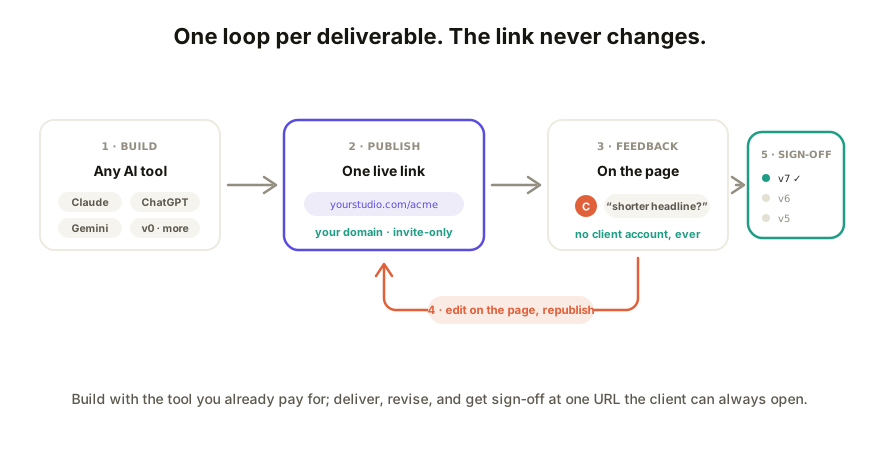
Build with whatever AI tool you already pay for. Claude, ChatGPT, Gemini, Lovable, v0, or hand-written HTML if that's you. Give it the content you own (scope, numbers, pricing logic, brand colors) and ask for an interactive page as one self-contained HTML file. The tools differ; the output is the same kind of thing.
Deliver through a collaboration layer. The HTML goes to a live URL that opens for anyone, takes comments in place, updates without resending, and carries your brand. That layer is deliberately tool-agnostic: switch AI tools next month and your delivery, your links, and your client history stay put.
The workflow, end to end
- Draft with your AI tool. Iterate until the page behaves. Keep calculation logic simple enough to verify by hand; you'll be quoting those numbers in a call.
- Publish to a live link. Paste the HTML into your collaboration layer. For anything carrying pricing or client data, set the link to password or invite-only before it leaves your desk.
- Send one link. Not an attachment, which breaks, and not your AI tool's share link, which hits a sign-in wall. The client clicks and it opens, on their laptop or their phone.
- Take feedback on the page. Comments arrive pinned to the element they're about. No screenshot annotation, no "see my third bullet" emails.
- Work the changes where they're cheapest. Copy and styling: edit directly on the live page in seconds. Structural or logic changes: back through your AI tool, republish to the same link.
- Close with a record. Every round lands in version history, so sign-off points at a specific version. Freeze a PDF snapshot at agreement if the file cabinet wants one.
- Duplicate for the next client. A deliverable that worked becomes your template. The second one costs an evening; the fifth costs an hour.
What to charge
Short version: don't price the prompt, price the deliverable. An interactive proposal that closes faster, or a report the whole client team actually reads, is worth what the static version was worth plus the difference it makes, regardless of how long generation took. The AI collapsed your cost, not your value. Clients pay for outcomes and polish; the polish is now largely a delivery question, which is the part this guide is about.
How Coedit fits
Coedit is the delivery layer in this stack: paste in what any AI tool built and share one live link that opens with zero client signup, takes comments pinned to elements, and lets you edit copy and style right on the page. Pro ($12 a month, priced under your AI subscription on purpose) puts deliverables on your own domain with no badge, adds password and invite-only links, and keeps full version history, which is your sign-off record. Viewing and commenting stay free without limit, so a roster of clients costs you one seat: yours. Coedit builds nothing; it makes what you build land like the work it is.
FAQ
Q: What AI deliverables can a freelancer realistically offer clients? A: Interactive proposals with live pricing, explorable reports and dashboards, ROI and quote calculators, client portals, and clickable prototypes. Anything that fits one web page and gets more persuasive when the client can operate it.
Q: Do I need to learn to code for this workflow? A: No. The AI tool writes the page from a plain-language brief, and a collaboration layer lets you change copy, styling, and design on the live page without touching code. The technical layer stays where the AI put it.
Q: What if the client wants changes after delivery? A: That's the loop working. Their comment on the page is the change request; small edits happen directly on the live page, bigger ones go back through your AI tool, and the same link always shows the current version with history behind it.
Q: How is this different from just hosting the file on Netlify or Vercel? A: Hosting solves "openable" and stops. It gives the client no way to comment in place, gives you no version record for sign-off, and assumes you're comfortable with deploys. The collaboration layer covers the rest of the client workflow, not just the URL.