TL;DR
A ChatGPT Space page is a document you and ChatGPT edit together, shared with named people or Teams at view, comment or edit access. OpenAI's docs describe no public link and no way in without the right ChatGPT account. For a client outside your workspace, use a ChatGPT Site or move the page to a link anyone opens.
What ChatGPT Space actually is
Space is the new home in ChatGPT for pages, files and shared work. OpenAI's admin docs call it "ChatGPT Space (formerly Library)," so if you're looking for your old Library files, that's where they went. The Space overview describes a page as "a document you and ChatGPT can edit together": notes, a plan, a team handbook, with child pages underneath. A space (lowercase in the docs) groups pages around a topic or team, and sharing the space shares every page in it.
It's more than a text editor. Type / on a page and the insert menu offers tables, images, files, prompt blocks and Visualize, which builds an interactive calculator, diagram or screen design right inside the page. Select a passage and you get Ask for change (ChatGPT rewrites just that bit) and Comment. You can @-mention ChatGPT inside a comment to hand it the job.
That's the honest pitch: if your team already lives in ChatGPT, Space is a real shared document with an AI in the margin. You need an account with Space enabled to use it, per OpenAI's getting started guide.
Who can open a shared page, and what they can do
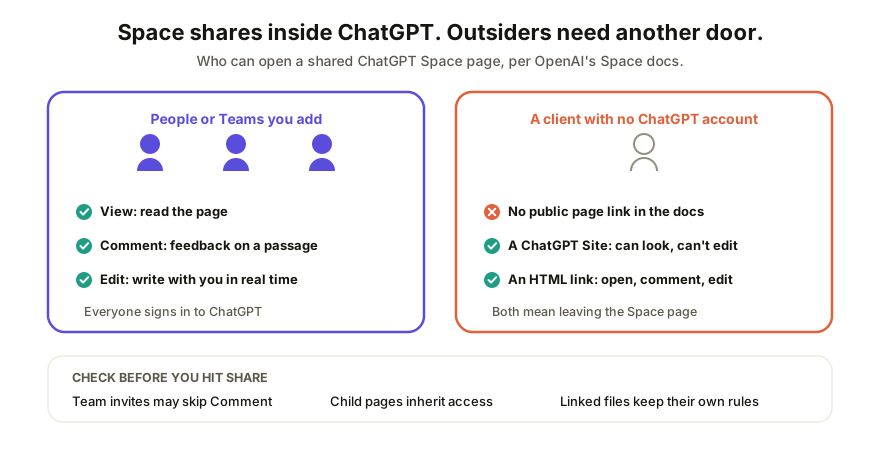
The collaboration docs give three access levels:
| Access | What the person can do |
|---|---|
| View | Read the page |
| Comment | Read it and leave feedback on a passage |
| Edit | Change the content with you, in real time |
You share by opening the page's sharing controls, adding "the intended people or Teams from the available options," picking a level and saving. Three details in the fine print are worth knowing before you hit Share:
- A Team invite may skip comment access. The docs say "a Team invitation may offer view or edit access without comment access." So if you invite a whole Team and want feedback rather than edits, check what the dialog actually offered.
- Access inherits, and removing it doesn't always remove it. Sharing a page also shares its child pages, and sharing a space shares all of its pages. Remove someone's direct invite and they keep whatever they inherit from the parent.
- Linked files keep their own permissions. A collaborator who can read your page "may still lack permission to open a source linked from it." Anything you copied or summarized onto the page, though, they can see.
Sharing a page doesn't share your private chats or saved memory, which is the right default.
Can you share a ChatGPT page publicly?
Not that we can find. The Space docs we read describe sharing with people and Teams, and nothing else: no "anyone with the link" option, no public page, no guest access for someone without ChatGPT. When a person can't open a page, the docs' first troubleshooting step is to "check that they are using the intended account and workspace," which tells you the model. Every reader is a signed-in ChatGPT user your workspace lets you pick.
Compare that with OpenAI's other sharing surface. The Sites docs list audiences right up to "Anyone on the internet" and an "Invited external viewers" option for named outsiders. And OpenAI's own Visualizations guide says to use a Site "when you need a durable hosted application with a shareable URL." So the vendor is drawing the line itself: Space is where your team works, Sites is where things go out. (We covered what Sites can and can't do here.)
One caveat. Space just launched and OpenAI ships fast. If a public option shows up, we'll update this post. Check the sharing dialog in your own account before you rely on either answer.
Space, Sites or Coedit: which fits the job
| Job | ChatGPT Space page | ChatGPT Site | Coedit |
|---|---|---|---|
| Write and revise a doc with ChatGPT in the margin | Yes, that's the point | No, it's a hosted site | No, Coedit doesn't generate |
| Readers with no ChatGPT account | Not described in the docs | Yes, with "Anyone on the internet" | Yes, 0 accounts for viewers |
| Comments on a passage or element | Yes, for people you share with | Not described in the docs | Yes, pinned to the element, for anyone you allow |
| Outside people edit | Only people you can add from your workspace's options | No, external viewers can't edit | Yes, for people you allow |
| Works on a page built in Claude, Gemini, v0 or by hand | No, pages are made in Space | Through ChatGPT or Codex (Codex can link a local project) | Yes, any HTML |
| Your own domain | Not described in the docs | Where available (not Enterprise at launch) | Yes, on paid plans |
"Not described in the docs" means we read OpenAI's Space pages and it isn't there. It doesn't mean it can't exist. It means you shouldn't promise it to a client yet.
What to do when the reader is outside ChatGPT
Say you drafted a proposal in a Space page, dropped in a pricing calculator with Visualize, and now the client wants to look. You have three honest routes:
- They have ChatGPT and your workspace lets you add them. Share the page with comment access and you're done. Ask them to try it once while you're on a call, so a wrong-account problem shows up early.
- Turn the interactive part into a Site. That's OpenAI's documented answer for a shareable URL. You get public or invite-only access, but the client can look, not edit, and Sites' docs don't describe comments.
- Move the page to a link built for outsiders. Ask ChatGPT in a chat to rebuild the page (or the calculator) as one self-contained HTML file, download it, and publish it somewhere the client can open, comment and edit without an account. That's a prompt, not an export button: the Space docs we read don't describe exporting a page as HTML, so check the file opens on its own first (here's why some HTML files break when shared).
Pick by what the client needs to do. Read only: route 2 is fine. Point at the wrong number and fix a typo: route 3.
How Coedit fits
Coedit doesn't write pages and doesn't compete with ChatGPT on drafting. It takes the HTML you already have, from ChatGPT, Claude, Gemini, v0, Lovable or a file you wrote by hand, and turns it into one link anyone can open with no account. People you allow leave comments pinned to the exact element, edit text without code, and every change lands in one version history with rollback. Space is a good place to think with your team. Coedit is where the finished thing meets people who will never get a seat in your workspace.
FAQ
Q: What is ChatGPT Space? A: It's ChatGPT's home for pages, files and shared work, and it replaces Library (OpenAI's admin docs call it "ChatGPT Space (formerly Library)"). A page is a document you and ChatGPT edit together, with comments, child pages and interactive visualizations. A space groups related pages so you can share them together.
Q: Can I share a ChatGPT Space page with someone who doesn't have ChatGPT? A: OpenAI's Space docs don't describe a way. Pages are shared with people or Teams you pick from your account's options, and the troubleshooting advice is to check the person is signed in to the right account and workspace. For an outsider, the documented route is a ChatGPT Site, or move the content to a link that needs no account.
Q: Can people comment on a ChatGPT Space page? A: Yes, if you give them comment or edit access. They select a passage and choose Comment, and you can mention ChatGPT in a comment to ask it for help. A Team invitation may offer view or edit access without comment access, so check the dialog.
Q: What's the difference between a ChatGPT Space page and a ChatGPT Site? A: A page is a shared document for people inside ChatGPT. A Site is a hosted website or app with its own URL, and its audience can go up to "Anyone on the internet." OpenAI's own docs say to use a Site when you need a shareable URL.
Q: Does removing someone from a shared page remove their access? A: Not always. Access inherits from a parent page or a shared space, and removing a direct invite doesn't remove inherited access. Check the parent's sharing controls too.