TL;DR
ChatGPT Sites (the feature this post first covered as Codex Sites) lets ChatGPT build, host and share a website, web app or game from a prompt. It is no longer workspace-only. Since July 9, 2026 it has been in public beta, with sharing from "owner only" up to "anyone on the internet," plus your own domain where available. So the real question is no longer "can I share it outside my company?" It's "was it built in ChatGPT, and does the person need to comment or edit?" Coedit takes output from any tool and adds that part.
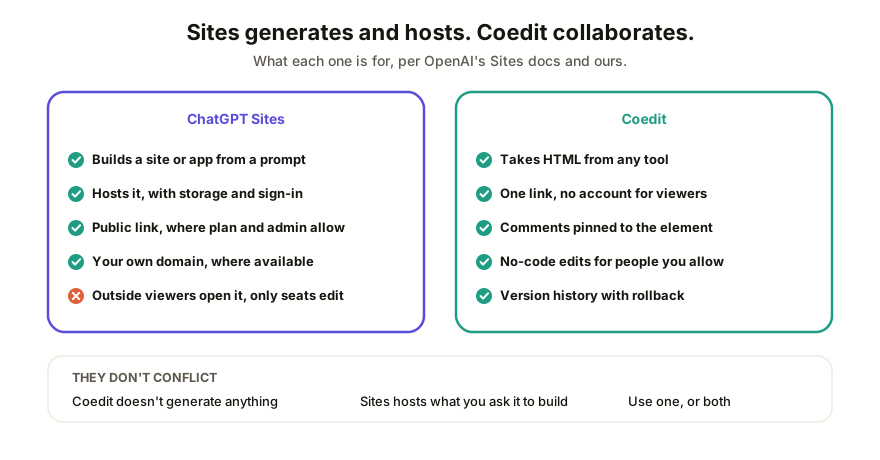
What ChatGPT Sites actually is
Sites is a ChatGPT feature that, in OpenAI's words, lets you "create, host, refine, and share websites, web apps, and games." You describe the thing, ChatGPT builds it, and it lives at a hosted URL with no separate deploy step. Apps can use a built-in database and file storage, and a Site can offer "Sign in with ChatGPT" for features that need to know who's visiting.
We got this one wrong, and it's worth saying how. An earlier version of this post, written when the feature was a Business-only preview (it launched June 2, 2026, and was documented as Codex Sites), said every viewer had to sit inside your ChatGPT workspace, with no public link and no custom domain. OpenAI's Business release notes show that changed on July 9, 2026, when Sites went to public beta and could be published to anyone through a URL. The current help article and Sites documentation say the same. We've rewritten the post around what they say today.
Who can open a Site, and what they can do
The help article lists the audience options below. A new Site starts out limited to its owner and workspace admins, and what you can pick depends on your plan and, in Enterprise, on your admin:
| Audience | What it means |
|---|---|
| Owner and workspace admins | Just you and your admins |
| Selected users or groups | Named people or groups in your workspace, where supported |
| Named external viewers | Named people outside your workspace, by email. They sign in with the account that got the invite, and they can't edit or publish |
| Anyone in the workspace | Every member of your ChatGPT workspace |
| Anyone on the internet | A public link, available without ChatGPT workspace access. In Enterprise it's off by default and needs admin approval |
One line in the docs matters more than the table: "Visitor access lets people open the Site; it doesn't give them editing access." Editors are a separate tier: the owner gives an active member of the same workspace Can edit access, and that editor can then publish later versions to the same URL without a separate approval step. Editing itself is done by describing the change to ChatGPT ("Edit site," then "Describe your edits"). So an outside viewer can look at a Site. Changing it is for people on the inside.
Custom domains are supported where available: you bring an apex domain or subdomain and update its DNS records. Only the owner can set one, and they aren't supported in Enterprise workspaces at launch. Public publishing and the expanded beta weren't available in the EEA, Switzerland or the United Kingdom at the July 9 launch.
Where each tool actually wins
| Job | ChatGPT Sites | Coedit |
|---|---|---|
| Build a site or app (with a backend) from a prompt | Yes, that's the point | No, Coedit doesn't generate |
| Host it without a separate deploy step | Yes | N/A, it hosts what you paste in |
| Public link anyone can open | Yes, where your plan and admin allow it | Yes, no account for viewers |
| Your own domain | Yes, where available (not Enterprise at launch) | Yes, on paid plans |
| Take a page built in Claude, Gemini, v0, Lovable or by hand | The help article describes building from a prompt, not importing a finished page | Yes, tool-agnostic |
| Comments pinned to an element of the live page | Not described in the help article | Yes |
| Teammates change the page by describing the edit | Yes, owners and workspace editors | Yes, for people you allow, including outside your company |
| Outside people edit the shared page | No, visitors and external viewers can't edit | Yes, for people you allow |
| Saved versions you can go back to | Yes, you save a version before deploying and the owner can restore one | Yes, one history across human and agent edits, with rollback |
Two things to read carefully. First, a row that says something isn't described means exactly that: we read OpenAI's help article and it isn't there, so check the product before you rely on either answer. Second, if the job is "ChatGPT, make me a site and put it online," Sites is a fast, capable answer and there's no reason to route around it.
When you'd still reach for Coedit
Three situations come up. You built the page somewhere else, like Claude, Gemini, v0 or a hand-written file, and you want one place to share all of it. You need feedback from a client who will say "move this button" and expects to click on the button to say it. Or you want people outside your team to fix a typo without being handed a seat and without asking you to rerun a prompt.
How Coedit fits
Coedit doesn't compete with ChatGPT on generation and isn't trying to. Build the page in ChatGPT, Claude, Gemini, v0, Lovable or by hand, export or paste the HTML, and Coedit turns it into one link anyone can open with no account, comment on with feedback pinned to the exact element, edit without code, and roll back through version history. Paid plans put that link on your own domain. If you already publish from Sites, the two aren't exclusive: Sites hosts the thing, Coedit is where people react to it, whichever tool made it.
FAQ
Q: What is ChatGPT Sites, and is it the same as Codex Sites? A: It's the same feature. OpenAI's release notes show it launching on June 2, 2026 as a preview for Business workspaces with Codex access (its developer guide was still titled "Codex Sites"), then going to public beta on July 9, 2026. OpenAI's help article now says it's available to ChatGPT workspaces, Plus and Pro accounts, and not to Free or Go.
Q: Can I share a ChatGPT Site with someone outside my company? A: Yes. You can add named people outside your workspace as view-only viewers, or choose "Anyone on the internet" for a public link. In Enterprise workspaces the public option is off until an admin approves it. At the July 9 launch, public publishing wasn't available in the EEA, Switzerland or the United Kingdom, so check your region.
Q: Does ChatGPT Sites support a custom domain? A: Where available, yes. The owner connects an apex domain or subdomain they already own by updating its DNS records. Enterprise workspaces don't support custom domains at launch.
Q: Can a client comment on or edit a ChatGPT Site? A: Visitors and named external viewers can open a Site but can't edit or publish it. Editing is for the owner and for editors who are active members of the same workspace, and it works by describing the change to ChatGPT. OpenAI's help article doesn't describe page-level comments, so we haven't claimed either way.
Q: Can I move a page built elsewhere into Coedit to share it? A: Yes. Export or copy the page's HTML from any tool and paste it into Coedit for a link anyone can open, comment on and, if you allow it, edit.