TL;DR
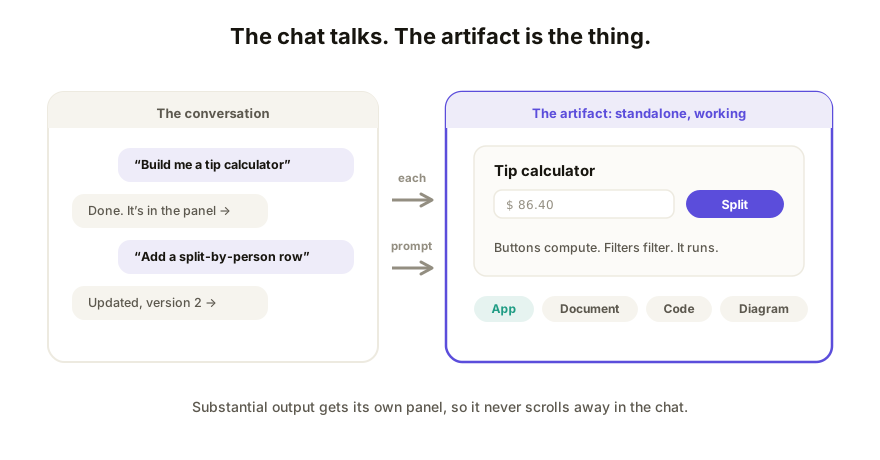
A Claude artifact is a standalone piece of content Claude creates in a panel beside your chat: an interactive web app, a document, a diagram, or a file of code. Artifacts exist so substantial output doesn't scroll away inside the conversation. You refine one by prompting ("make the buttons bigger"), and you can share it by email, with your organization, or with a link for anyone signed in to Claude. (Since September 16, 2026 an artifact can also be a design, a deck or a document.)
What counts as an artifact
When Claude produces something substantial enough to stand on its own, it puts it in the artifact panel instead of the chat stream. In practice that's one of a few shapes:
| Artifact type | What it is | Example |
|---|---|---|
| Interactive app or page | A working web page (HTML, or a React component) | A tip calculator, a quiz, a landing page |
| Document | Formatted text you'll keep editing | A proposal, a policy, a report |
| Code | A file of source code | A Python script, a config file |
| Diagram or graphic | An SVG image or a Mermaid diagram | A flowchart, a logo sketch |
The interactive kind is the one this blog cares about most: under the hood it's a web page, which means it's portable. You can get the HTML out and it will run in any browser, with or without Claude.
How an artifact works
You don't create an artifact directly; you ask Claude for something and it decides the output deserves the panel. ("Build me a mortgage calculator" reliably does it. You can also just ask for an artifact by name.)
From there the loop is conversational. Every change is a new prompt, Claude rewrites the artifact, and a version stepper in the panel lets you flip back through earlier takes within that chat. You never have to touch the code, though it's there if you want it.
What artifacts can do in 2026
The feature has grown well past "code preview in a side panel." As of mid-2026:
- Share. A new artifact starts private. You can share it with specific people, your organization (Team and Enterprise) or "anyone with the link," which means anyone signed in to Claude, at view, comment or edit level. Legacy artifacts (made before September 16, 2026) can still be published to a link anyone can open with no account.
- Copy. Someone can start a new chat from a published artifact and take it in a new direction. Their copy is separate; yours doesn't change.
- AI inside the artifact. Artifacts can call Claude from within the page, so you can build tools that themselves think: a flashcard app that generates cards, a critic that rewrites your text. Viewers sign in with their own account for those features, and the usage counts against their plan, not yours.
- Saved data. Artifacts can store data between visits, up to 20 MB per artifact, either per-person (everyone gets a private bucket) or shared (everyone sees the same data). That makes trackers, journals, and leaderboards possible.
- Connected dashboards. On the desktop app, artifacts can pull live data from services you've connected (via MCP), so a dashboard re-queries your real tools when you open it. Personal-use only at launch.
Where artifacts stop
The panel is built for one relationship: you and Claude. Sharing now includes comment and edit roles, but they're for people signed in to Claude, every edit still runs through prompting Claude, and the URL is Claude's, not yours. A copy forks the work instead of collaborating on it. None of that is a bug; it's the shape of the feature. We've mapped the walls in detail in when to use Claude Artifacts (and when not to) and the sharing limits specifically.
How Coedit fits
Coedit picks up where the panel stops. It never generates anything (Claude already did that); it takes the artifact's HTML and gives it a live link built for other people: viewing and commenting with zero accounts, no-code editing for teammates, one version history across human and agent changes, your own domain on paid plans. Same flow for output from ChatGPT, Gemini, v0, Lovable, or hand-written HTML.
FAQ
Q: What is a Claude artifact, in one sentence? A: A standalone piece of content (an interactive web app, document, code file, or diagram) that Claude creates in a panel beside the chat so you can iterate on it, publish it, and share it.
Q: Do people need a Claude account to see my artifact? A: For a new artifact, yes: "anyone with the link" means anyone signed in to Claude, and invitees need an account too. Legacy artifacts published before September 16, 2026 still open for anyone with the link, no account needed.
Q: Can someone else edit my artifact? A: Not the one you shared. With their own Claude account they can remix it, but that creates their own copy in their own chat. Nothing flows back to yours. Shared editing needs a collaboration surface outside Claude.
Q: Is an artifact a real app? A: The interactive ones are: real HTML and JavaScript running in a browser, which is why you can export the file and host it anywhere. See what is an AI-built app for the wider category.
Q: What's the difference between an artifact and a Claude Project? A: A Project is a workspace: shared context, files, and instructions for a set of chats. An artifact is a single output inside a chat. You'll often make artifacts inside a Project, but they're different layers.